General
Life
Accessibility Options


General

General Products
Simple & Transparent! Policies that match all your insurance needs.
 Car Insurance
 Two Wheeler Insurance
 Commercial Vehicle Insurance
 Health Insurance
 Home Insurance
 Travel Insurance
 Business Insurance
Car Insurance
Two Wheeler Insurance
Commercial Vehicle Insurance
Health Insurance
Travel Insurance
Business Insurance
Car Insurance
Two Wheeler Insurance
Commercial Vehicle Insurance
Health Insurance
Travel Insurance


Scan to download

Life

Life Products
Digit Life is here! To help you save & secure your loved ones' future in the most simplified way.
 Term Life
 Savings Plan
 Retirement and Pension Plans
 Group Life Products
 Product Documents
Term Life
Savings Plan
Retirement and Pension Plans
Group Life Products
Product Documents
Term Life
Savings Plan
Retirement and Pension Plans
Group Life Products
Scan to download

Claims

Claims
We'll be there! Whenever and however you'll need us.
 Customer Support
 Motor Claims
Health Claims
Motor Claims
Health Claims
 Marine Insurance
 Grievance Redressal
Customer Support
Motor Claims
Health Claims
Marine Insurance
Grievance Redressal
Grievance Redressal
Customer Support
Motor Claims
Health Claims
Marine Insurance
Grievance Redressal
Scan to download
 General
 Life
General
Life
Life
General
Life
Renewals
Resources
Resources
All the more reasons to feel the Digit simplicity in your life!
Exclusive Features
 Transparency Report
Others
Exclusive Features
Transparency Report
Transparency Report
Others
Exclusive Features
Transparency Report
Scan to download


Our WhatsApp number cannot be used for calls. This is a chat only number.

 Grey Scale
 Readable Text
 Reset
Reset



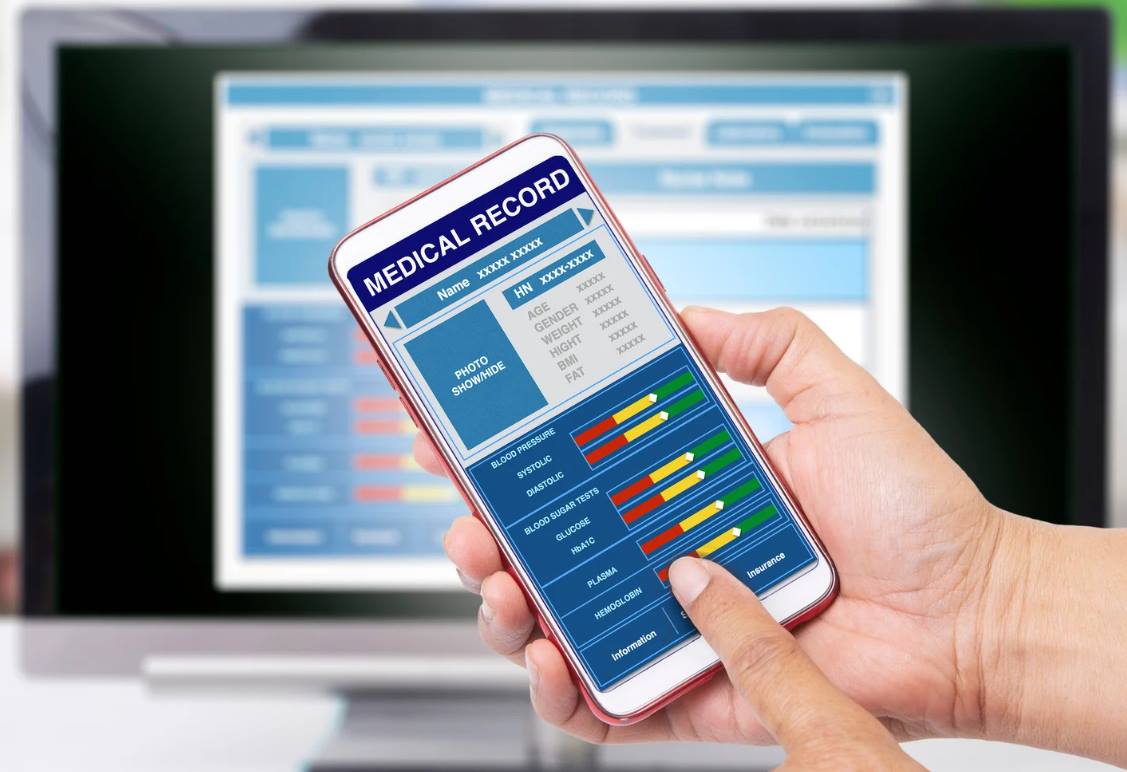
A PHR (Personal Health Record) Address in Health ID is essential for managing your health records securely and efficiently. It acts as a unique username, allowing you to access and share your medical history easily. This is particularly useful during emergencies when quick access to health information is crucial.
In this article, we will guide you through the steps to create your PHR Address in Health ID. You’ll also discover the benefits of having a PHR Address and how it can help you keep your health information organized and accessible. Follow along to understand how to manage your health records effectively.

Table of Contents

A Personal Health Record (PHR) is a digital or paper-based record you manage. It contains your health information, including details such as medical history, medications, test results, and more. Unlike electronic health records (EHRs) managed by healthcare providers, PHRs are controlled by you, allowing you to update and share your health information with doctors or family members as needed.
Having a PHR helps you keep a comprehensive and organized health record, making it easier to track your health status, share information with healthcare providers, and manage your care more effectively.
A PHR (Personal Health Record) Address is a unique username linked to your Health ID. It helps you manage and access your health records safely. With this address, you can store and organize your medical information online, making it easy to view and share with doctors.
This address keeps your health data private and secure. It lets you decide who can see or handle your information. This system helps keep your health records up-to-date and organized, essential for managing your health effectively.
A PHR address offers several key benefits that improve how you manage and access your health information. Here’s how having one can enhance your healthcare experience.
To obtain a PHR address in Health ID, you must meet specific criteria. Here's a summary of the eligibility requirements.
To set up your Personal Health Record (PHR) address online, follow these steps
Step 1: Select a PHR Platform
Start by researching different PHR platforms to find one that fits your needs. Consider factors like user reviews, features, and ease of use.
Step 2: Create an Account
Once you’ve chosen a platform, register by providing your personal information. This typically includes your name, contact details, and sometimes additional identification.
Step 3: Enter Health Information
After setting up your account, input your medical history into the platform. Include past medical reports, current medications, and any allergies you have.
Step 4: Upload Documents
Upload any relevant documents as required by the platform. This might include medical records or identification documents to complete your profile.
Step 5: Access Your PHR Address
Once your account is fully set up, you will receive a URL or login credentials to access your health records. Use this link to manage and view your medical information.
Keep your login details secure to protect your health data. Also, some platforms may charge a subscription fee, so review all terms and conditions before finalizing your registration.
To create a PHR address in ABHA health ID, follow these steps
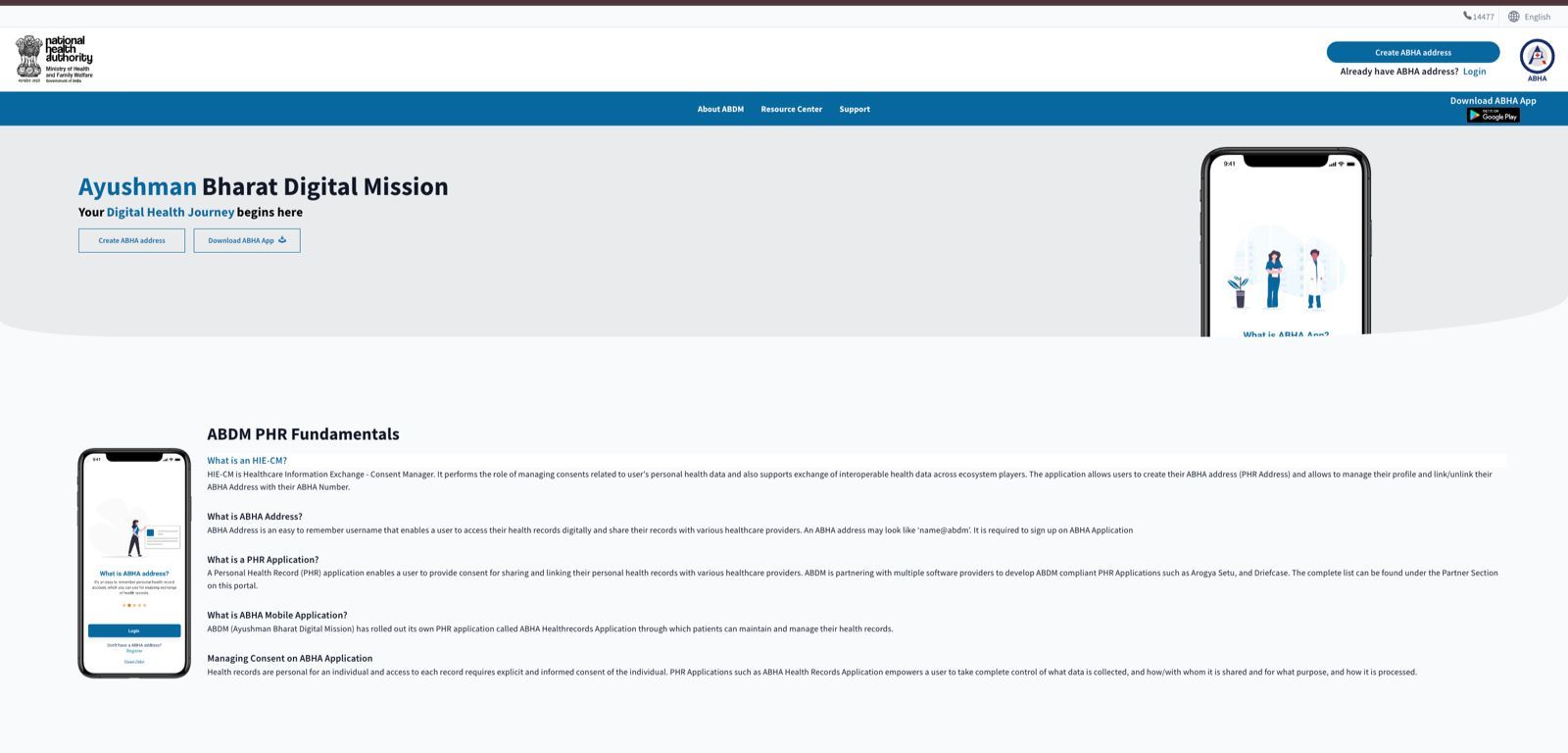
Step 1: Access the ABHA Portal
Visit the ABHA website and click "Create ABHA Address" to begin the process.
Step 2: Initiate Registration
Choose whether to register using your mobile number or an existing ABHA number if you have one.
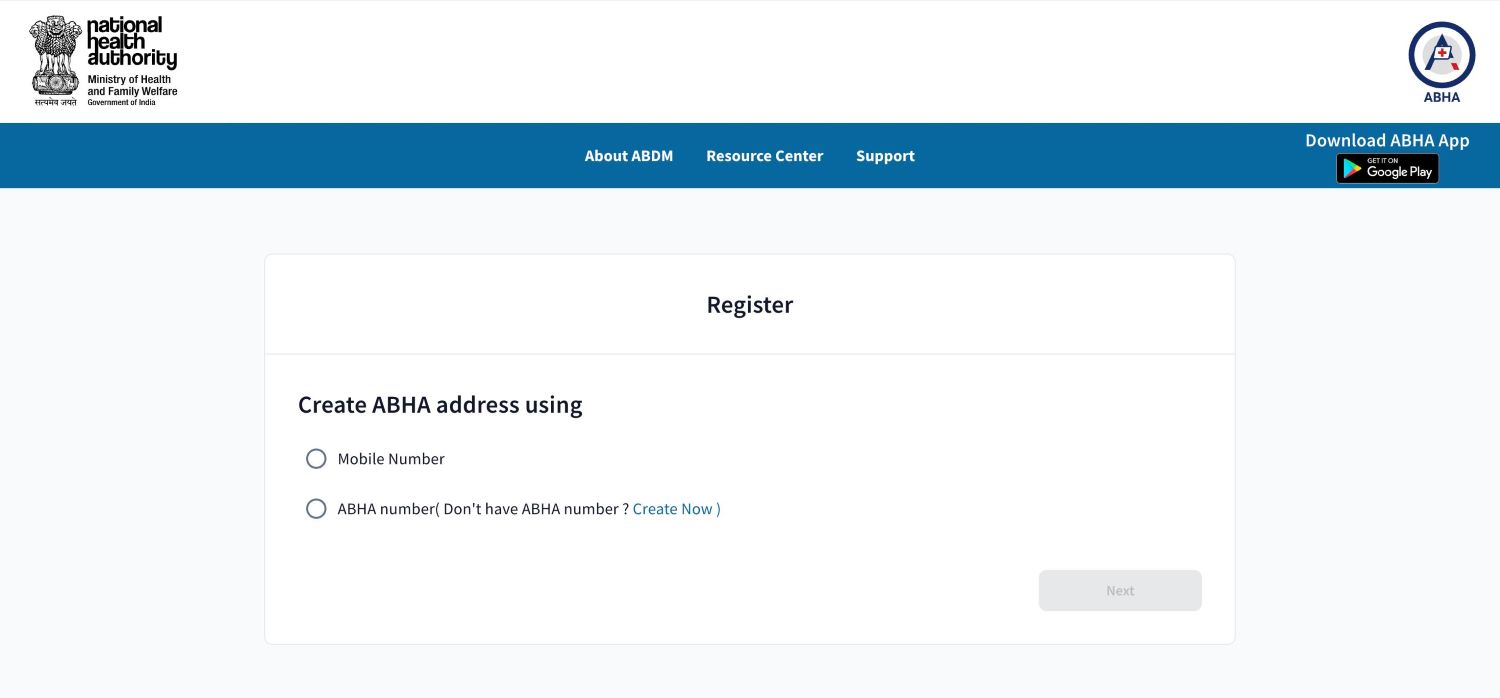
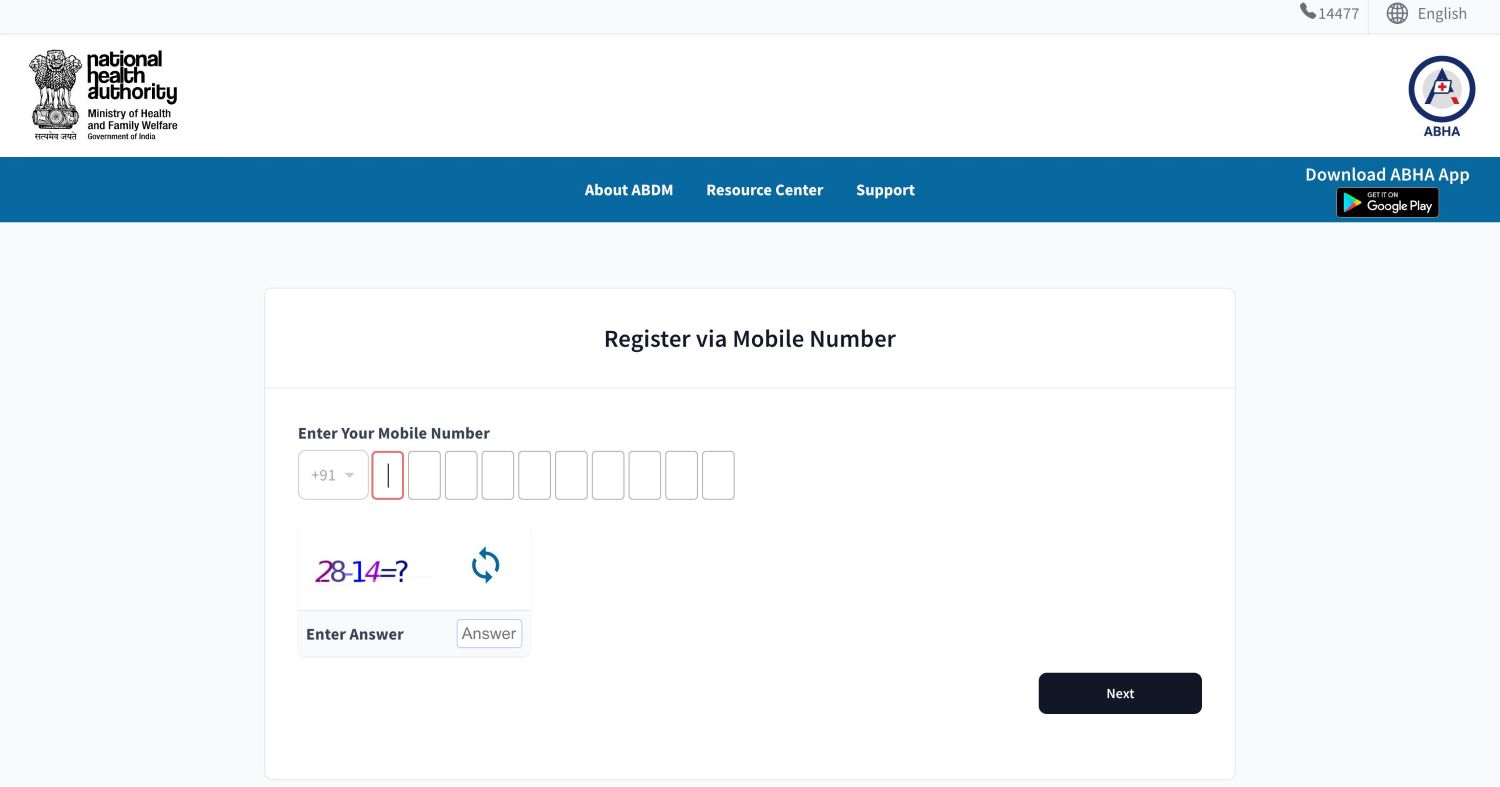
Step 3: Enter Your Mobile Number
Provide your mobile number and the captcha code to receive a One-Time Password (OTP) on your phone.
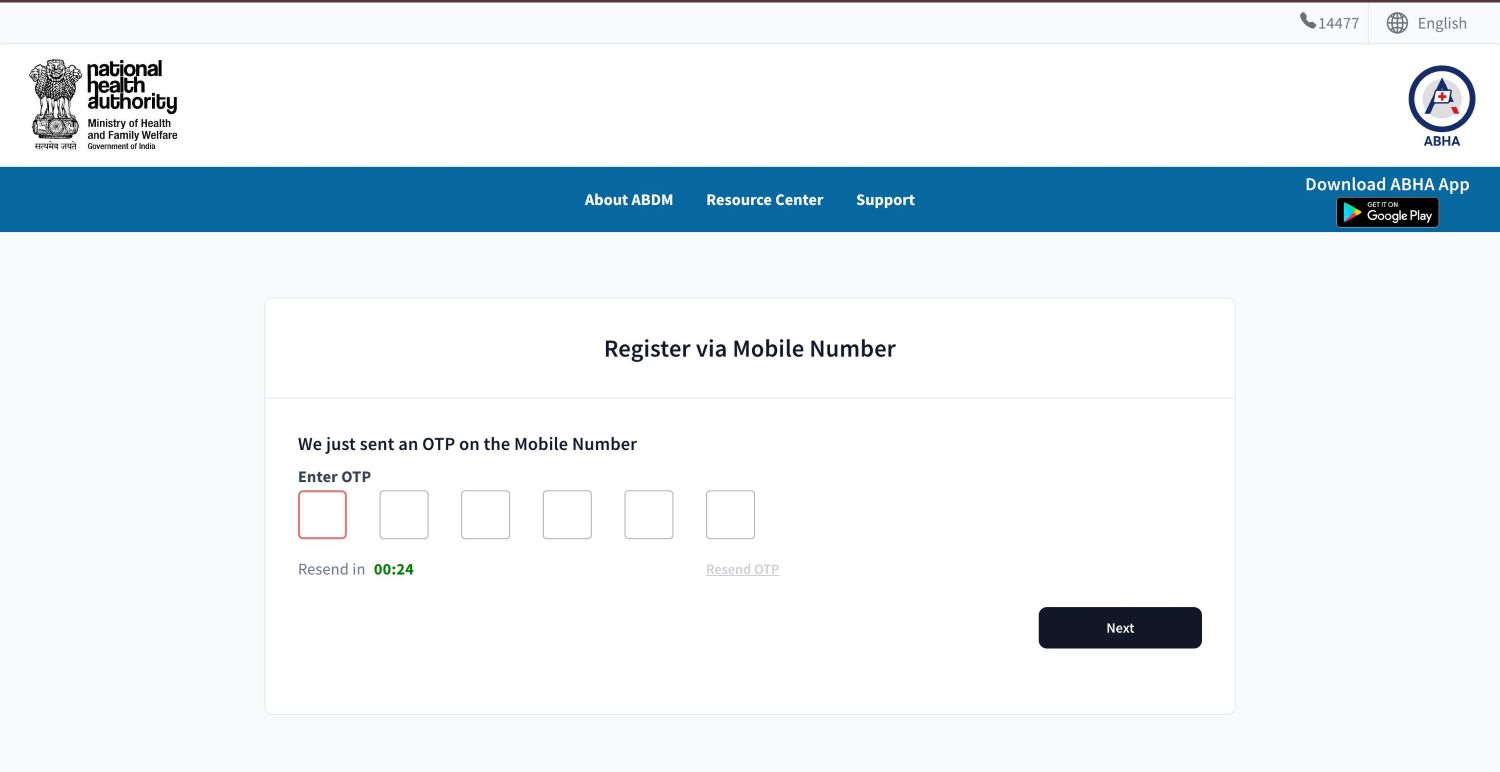
Step 4: Verify OTP
Enter the OTP you received on your mobile device and click "Next" to proceed.
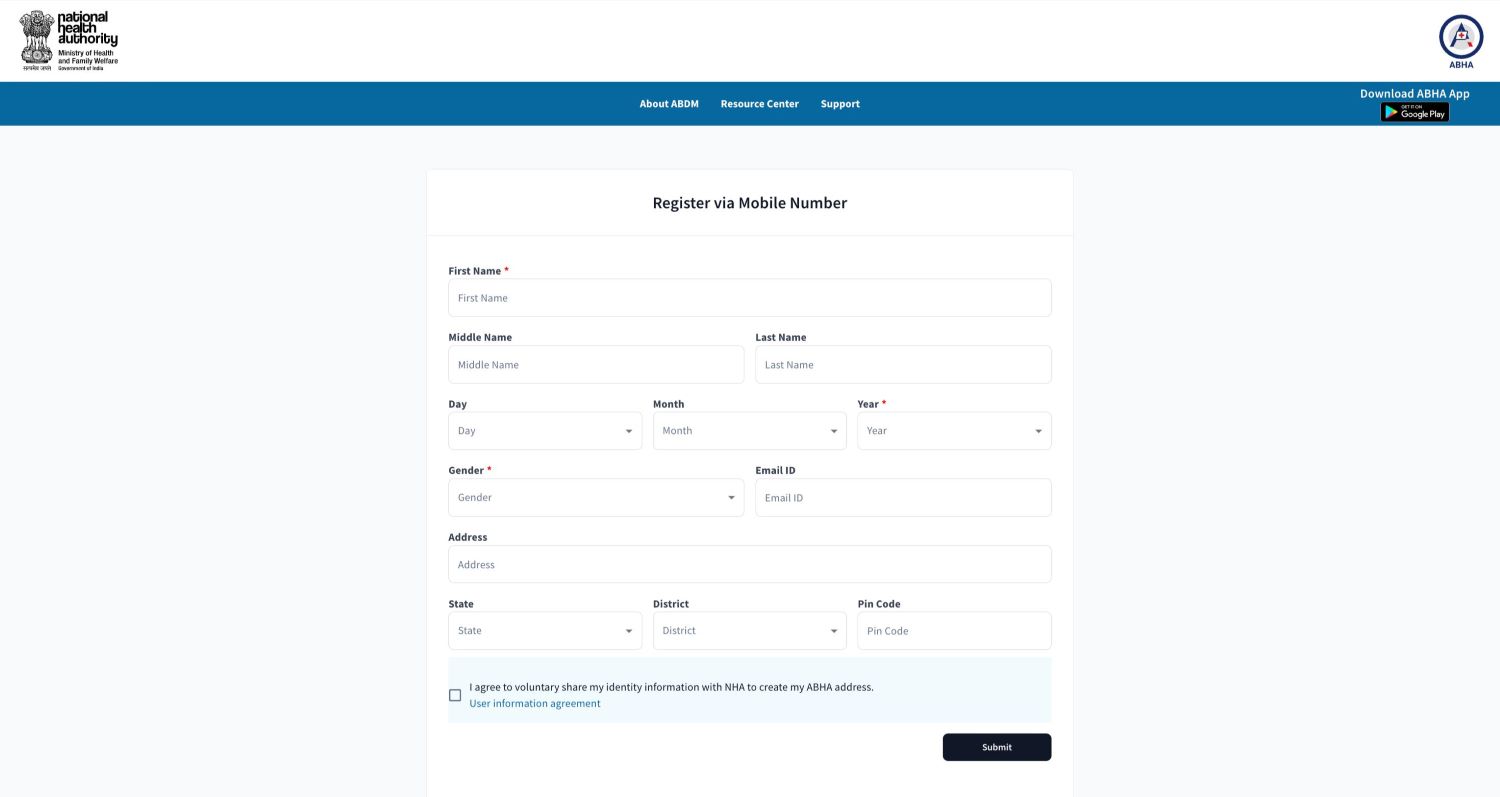
Step 5: Provide Personal Information
Fill in your personal details, such as your name, date of birth, and email address.
Step 6: Create Your ABHA Address
Choose your ABHA address and set a secure password.
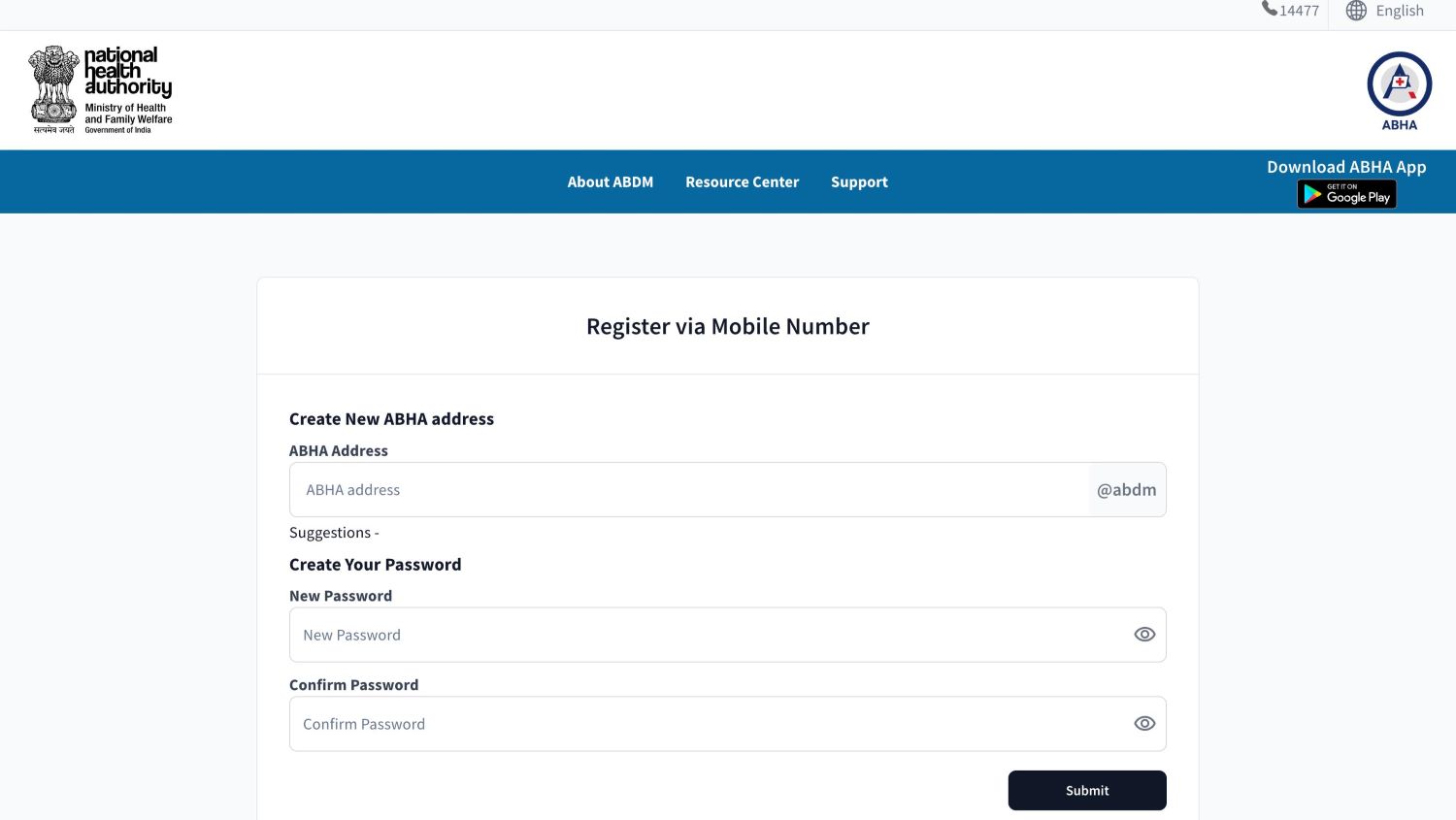
Step 7: View and Download Your Card
Once your ABHA address is created, you can view your ABHA card, which includes your ABHA address, ABHA number, and QR code. You can also download the card to your device for your records.
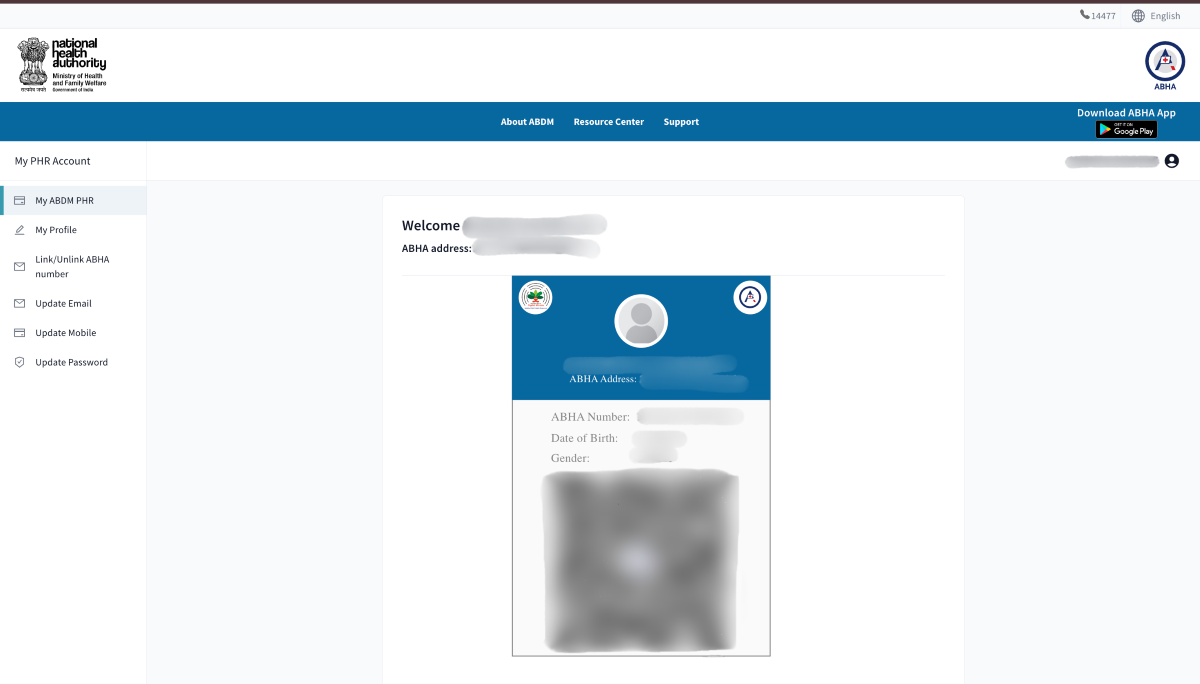
If you already have an ABHA number, enter it to retrieve your details automatically. You can then create your ABHA address and set a new password, allowing you to view and download your ABHA card.
To set up a Personal Health Record (PHR) address, you'll need to provide the following documents and information
Keeping your personal information up-to-date in your PHR address is important for accurate and accessible healthcare records. Here’s how you can do it
Step 1: Log in to the ABHA Portal
Visit the ABHA portal and log in using your ABHA or mobile number. Enter the details and complete the OTP verification sent to your mobile.
Step 2: Access Your ABHA Address
Once logged in, you will see your ABHA address linked to your mobile number. Click on it to go to your profile.
Step 3: Update Information
On the left side of the portal, you can choose to update your mobile number, email address, and password. Follow the prompts and complete the OTP verification to update each piece of information.
To download your ABHA card, follow these steps:
Step 1: Access the ABHA Portal
Visit the ABHA portal and log in using your ABHA or mobile number. Complete the OTP verification sent to your mobile.
Step 2: Access Your ABHA Address
Once logged in, you will see your ABHA address linked to your mobile number. Click on it to go to your profile.
Step 3: Download Your ABHA Card
On your profile page, find the option to download your ABHA card. Click on it to download the card, which includes your ABHA address, ABHA number, and QR code, to your device for your records.
Creating a PHR Address in your ABHA Health ID is a valuable step toward better health management. By securely storing, updating, and sharing your medical records, you ensure that your healthcare providers can access accurate information, improving care and treatment outcomes.
By taking the time to set up your PHR Address, you're investing in a more organized and efficient way to manage your health, ultimately empowering yourself to make informed decisions and stay on top of your well-being.
A Personal Health Record (PHR) allows individuals to store, manage, and access their health data digitally. This becomes especially useful during emergencies or while visiting different hospitals.
Moreover, having a PHR can also help you in the claiming process with a comprehensive health insurance plan. It can ensure smoother claim processes and quicker approvals, as the insurer can readily access your health history.
Please try one more time!